
Tripadvisor: Plan & Book Trips
TripadvisorTravel & Local
4.569.05K Reviews
- Version
- 69.5
- Installs
- 100.00M
- Age Rating
- Everyone
Screenshots


Our Review of Tripadvisor: Plan & Book Trips
 Analysis by Appyee
Travel planning can become messy surprisingly fast: hotel tabs pile up, restaurant suggestions scatter across messages, and every attraction looks equally essential before I understand how far apart they are. Tripadvisor: Plan & Book Trips is most useful to me as a place to research those choices and keep promising stops together. It is a free travel app from Tripadvisor, and its broad mix of traveler opinions, photos, maps and booking options suits people who prefer to compare before committing. I would treat it as a practical planning companion, though, not as a guarantee that every review is current or every recommendation is right for my trip.
Where planning can get stuck
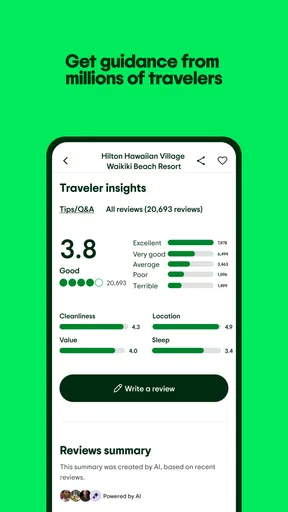
The sheer amount of choice is both the app’s strength and its main source of friction. A long stream of hotel reviews can help me spot recurring concerns, but it can also make a straightforward decision feel like homework. I get more value by comparing a few realistic options against my own needs than by trying to read everything. For a hotel, that might mean checking recent comments for patterns about noise, location or cleanliness rather than letting one glowing or angry review decide the whole booking.
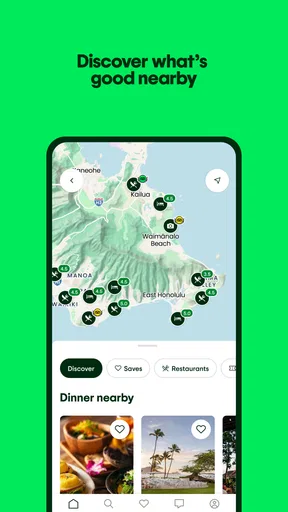
Destination research can also blur together if I browse without a plan. A popular restaurant may be well reviewed but still be inconvenient for the day I have in mind, while a famous attraction can take more time to reach than its map pin suggests. I use the map as a planning aid, then check the actual route and opening details through an appropriate source before heading out. That small second check matters most when timing is tight or a reservation depends on arriving promptly.
Setup checks that make research easier
When I first open a travel app, I begin with the destination and the kind of decision I need to make: where to stay, what to eat, or what to visit. Keeping those searches separate is less overwhelming than treating the whole trip as one giant list. I also save only places I can realistically imagine using. A short, deliberate shortlist is more helpful on the road than dozens of half-considered pins.
Tripadvisor is developed by Tripadvisor, and its scale is clear in the range of traveler contributions available to browse. It has a 4.5 average from around 1.5 million ratings, with over 100 million installs, so it is a familiar option for many travelers. The app is rated for Everyone, and it is free to download. Its current version is 68.4, with Android support starting at version 7.0. Those details make it easy to judge basic compatibility, but I would still check that my device has room to update and that I can get online when I need to search.
Recovering a trip workflow when it goes sideways
If a search is returning too many possibilities, I narrow the question instead of endlessly scrolling: choose a neighborhood, a type of place, or a specific day’s needs. If I have saved too many candidates, I review them against distance and timing and remove the ones that no longer fit. This is a simple way to turn research into a usable plan rather than a collection of attractive distractions.
I also avoid relying on one app screen as my only travel record. Before leaving, I keep essential booking details somewhere I can reach easily and make a note of the places that matter most. If a listing looks promising but a crucial detail is unclear, I confirm it with the venue or booking provider directly. That is not a knock on Tripadvisor; it is sensible travel preparation, especially when plans are expensive or difficult to change.
When the app is not the cause
Sometimes a search feels unhelpful because the question is too broad, not because the app has failed. “What should I do in this city?” invites an enormous range of suggestions. “What can I fit near my hotel this afternoon?” gives me a more useful starting point. Likewise, a place that seems far away on a map may still be easy to reach, or a nearby pin may be separated by awkward streets or transport routes. I check the route before building the day around it.
Reviews are personal accounts, not promises that I will have the same experience. I look for details that match my priorities and pay attention when several travelers raise the same concern. If I need live directions, transport information or confirmation that a venue is open right now, a dedicated maps or official venue source may be the better final check. Tripadvisor helps me discover and compare; it should not replace every other travel tool.
Features that Stand Out
First off, Tripadvisor: Plan & Book Trips is your one-stop shop for all your travel needs. Seriously, it’s like having a personal travel agent in your pocket. The app lets you browse through millions of traveler reviews, photos, and maps, making it easier to decide where to go, where to stay, and what to do.
Explore Like a Local
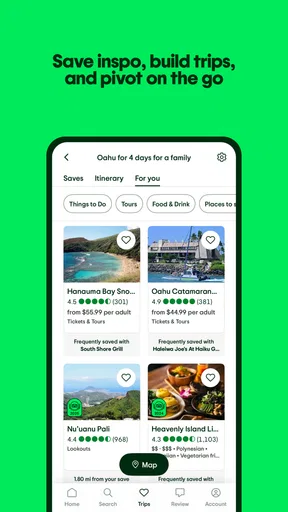
The coolest feature has to be the ability to explore destinations like a local. The app offers curated itineraries and insider tips from people who know the place best. Whether you’re looking for hidden gems or popular tourist spots, you’re covered. There’s even a feature that lets you save and organize your favorite spots, so you can have your dream itinerary at your fingertips.
Booking Made Easy
Booking flights and hotels? Piece of cake. The app compares prices from various booking sites, ensuring you snag the best deals. Plus, with the in-app booking feature, you can reserve your stay without having to hop between multiple sites. Convenient, right?
Dining Decisions Simplified
And when it comes to dining, oh boy, you’re in for a treat. The app not only lists nearby restaurants but also includes reviews and photos from fellow foodies. This way, you can make an informed decision on where to satisfy your cravings. You can even book tables directly through the app, skipping the long queues and wait times.
User-Friendly Interface
Now, let’s talk about the user interface. It’s clean, intuitive, and just plain easy to navigate. Whether you’re a tech whiz or someone who still struggles with smartphones, you’ll find this app a breeze to use. Everything is organized neatly, and the search function is robust, helping you find exactly what you’re looking for in seconds.
Making reviews work for you
The best way I’ve found to use a large review collection is to read for evidence, not just a verdict. A quick overall impression can help me shortlist a place, but the useful part is often the specific context: what a traveler valued, what disappointed them, and whether that concern matters to me. A family looking for quiet evenings may weigh a complaint differently from someone who plans to be out late. Reviews become more useful when I compare like with like.
Photos are helpful for forming a rough impression, but I don’t treat them as a complete picture of a room, meal or neighborhood. Images can show what a visitor chose to capture, not every practical detail I need. When a hotel decision hinges on a particular room feature or a restaurant visit depends on a dietary requirement, I verify that point directly rather than assuming a photo or review settles it.
A realistic day of planning
Imagine I arrive in a city for a short stay and have one free afternoon. I can look for a couple of nearby attractions, compare traveler feedback, and save a café or restaurant as a possible stop. Then I check the route and decide whether the places fit comfortably together. If the weather changes or I run late, I can choose from the remaining shortlist instead of starting my research from scratch. That is where saving and organizing places feels more valuable than simply collecting recommendations.
This approach also helps when several people are traveling together. Each person can suggest a place, but the group still needs to weigh distance, timing and different preferences. I would use Tripadvisor to gather candidates and discussion points, then agree on a manageable plan rather than assuming the app can resolve everyone’s priorities. The tool helps narrow choices; the actual trade-offs are still ours to make.
Where it fits among travel tools
Compared with using a maps app alone, Tripadvisor is stronger for browsing traveler impressions and discovering places to consider, while a dedicated map is usually the more natural choice for route checking and getting around. Compared with searching the web page by page, it brings reviews, photos and trip research into a more focused travel context. For a booking decision, price comparisons can be useful, but I still read the final terms on the booking provider’s screen before paying. A displayed option is a starting point, not a reason to skip the details.
I would not make it my only tool if my trip depends on live transit changes, precise navigation, or official information about hours and entry rules. Nor is it the right fit for someone who already has a trusted booking routine and wants nothing beyond a simple route planner. Its appeal is greatest when I am still deciding what is worth doing and want traveler feedback alongside places to save. If I know exactly where I am going and only need turn-by-turn directions, a maps app is the more direct choice.
Personal Experience
On a personal note, using the app for my last trip was a lifesaver. I was planning a week-long getaway to Barcelona and didn’t know where to start. Thanks to the app, I discovered charming little cafes and vibrant local markets that weren’t even on my radar. Plus, being able to read reviews from other travelers gave me peace of mind when booking accommodations.
The real kicker was the dining suggestions. I ended up at a tucked-away tapas bar that served the best patatas bravas I’ve ever had. I wouldn’t have found it without the app’s recommendations.
Who will get the most from it
I’d recommend it to someone planning an unfamiliar destination who enjoys comparing places before choosing, or to a traveler who wants one research space for hotels, restaurants and activities. It is also useful when a trip has open time that could be shaped around nearby discoveries. People who prefer a highly structured itinerary may appreciate saving candidates first, then deciding which ones genuinely fit each day.
I’d be more cautious if you dislike reading user opinions, want every travel detail handled automatically, or need a single authoritative source for time-sensitive information. The volume of choice can feel like clutter if you only want one quick answer. In that case, start with a narrow search and use another source for the final practical check. The app works best when I treat it as a guide to possibilities, not as the trip’s sole decision-maker.
Wrapping It Up
In a nutshell, if you’re someone who loves traveling but dreads the planning chaos, Tripadvisor: Plan & Book Trips is your new best friend. With its comprehensive features, user-friendly design, and reliable recommendations, it’s like having a travel guru guiding you every step of the way. So, why not give it a whirl? Download it, explore the world, and make your next adventure a breeze!
My practical verdict
For me, Tripadvisor earns a place in the planning stage because it combines traveler reviews, photos, maps and ways to save appealing stops. Its travel-focused approach is more revealing than a bare map when I am choosing where to stay or what might be worth visiting. The trade-off is that broad browsing can consume time, and no collection of opinions can guarantee that a place will suit my own tastes or circumstances.
Verdict
Strengths of Tripadvisor: Plan & Book Trips
- Extensive travel destination database.
- User reviews offer detailed insights.
- Easy-to-use interface for planning.
- In-app booking for convenience.
- Personalized recommendations available.
Limitations of Tripadvisor: Plan & Book Trips
- Ads can be intrusive at times.
- Some features require in-app purchases.
- Offline access is limited.
- Occasional glitches with search results.
- Account creation needed for full access.
Similar Picks in This Category
View All
Google Maps
Google LLC3.4

Google Maps Go
Google LLC4.1

Booking.com: Hotels & Travel
Booking.com Hotels & Vacation Rentals4.8

Google Earth
Google LLC3.8

Skyscanner Flights Hotels Cars
Skyscanner Ltd4.8

trivago: Compare hotel prices
trivago N.V.4.4
You May Also Like
View All
Frequently Asked Questions
What features does the Tripadvisor app offer?
The Tripadvisor app is a comprehensive travel tool that features user reviews, photos, and ratings for hotels, restaurants, and attractions worldwide. It also offers booking options for accommodations, flights, and experiences. Additionally, it provides personalized recommendations based on your preferences and travel history, ensuring a smooth and tailored travel planning experience.
Is the Tripadvisor app free to use?
Yes, the Tripadvisor app is free to download and use. Users can access a wide array of travel resources, including reviews, photos, and maps, without any charges. However, fees may apply for booking services such as hotels, flights, and tours, which are facilitated through the app's partners.
How reliable are the reviews on Tripadvisor?
Tripadvisor reviews are submitted by real travelers and are moderated to maintain authenticity. While most reviews provide valuable insights, it's important to read multiple reviews to get a balanced perspective. The app also highlights recent reviews and offers filtering options to help you find the most relevant and trustworthy opinions.
Can I use the Tripadvisor app offline?
The Tripadvisor app offers limited offline functionality. You can save maps and reviews for certain locations, allowing access without an internet connection. This feature is particularly useful when traveling in areas with limited connectivity. However, booking and some interactive features require an active internet connection.
Does Tripadvisor offer customer support for bookings?
Yes, Tripadvisor provides customer support for bookings made through its app. Users can access support via the app or website to manage reservations, address issues, or seek assistance. The support team is available to help ensure a smooth travel experience, handling inquiries related to flights, hotels, and other travel services.
